


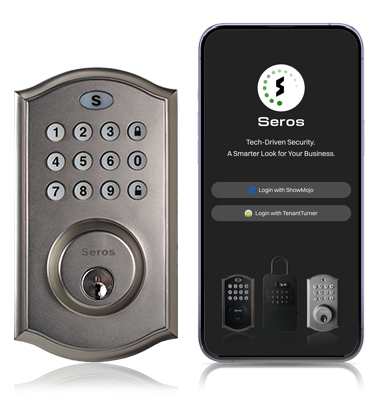
SerosLock Specifications
Construction: Aluminum Alloy and Plastic
Operating Temperature: -31 to 140 Fahrenheit
Water and Dust Resistance Rating: IP54
Keypad Dimensions: 5-1/4”(H) x 3”(W) x 1”(D)
Interior Housing Dimensions: 6-1/2″(H) x 2-7/8″(W) x 2″ (D)
Setup: Download the SerosAccess App and Go


- Install the lock onto the door following the detailed instructions. Add four AA batteries and close the battery compartment.
- Download the SerosAccess mobile app. (SerosLocks can be used for free and with no monthly fee only from the SerosAccess mobile app.)
- In the SerosAccess app, create a free account (or sign in, if you already have an account).
- Follow the Add Device steps in the SerosAccess mobile app.
- Create access codes, set fixed codes, and do much more directly from the SerosAccess app.
SerosLock FAQs
The SerosLock is a digital deadbolt built directly into your door, delivering secure, affordable, and flexible access control. It requires no internet connection, no hub, and installs just like a standard mechanical deadbolt.
Think of it this way: if smart home devices manage your house — thermostats, lights, doorbells — smart access focuses on the door itself. And the benefits are remarkable.
Originally built to integrate with ShowMojo, SerosLocks can now be purchased and used entirely on their own.
Now anyone can benefit from powerful, effortless smart access.
-
Simple, intuitive operation through the SerosAccess mobile app or by entering an access code on the keypad.
-
Highly versatile access control, with codes restricted by hour, day, or date — for durations up to 29 months.
-
Keyless access for residents that not only enhances convenience but can also support truly key-free rentals and the cost savings that follow.
-
Self-showings become easier when prospects no longer deal with fussy lockboxes or loose keys.
- SerosLocks are transferable when a home is sold or moved between property managers or owners.
SerosLock technology is built on a supply chain with deep experience in U.S.-based deadbolts and smartlocks. While we don’t name names, SerosLock uses the same proven technology found in several trusted U.S. brands.
It’s engineered for real-world durability, rated to operate reliably in both hot and cold climates, and factory-tested to withstand temperatures from –31ºF (–35ºC) up to 140ºF.
Yes! SerosLocks are built with an IP54 rating. The device is very reliable, even when exposed to open rainfall as long as certain conditions are met:
- Installation must follow instructions
With four alkaline AA batteries, a SerosLock typically operates for about ten months under normal use (lithium batteries are not recommended).
When the batteries reach roughly 33% capacity, the lock alerts the user. It will continue to function normally, but the indicator will flash red 6 times during use to signal low battery.
For backup power, the SerosLock includes a front-facing USB-C port. Plug in any standard battery pack or wall charger to unlock the door even when the internal batteries are fully depleted.
Keypad Access Codes
Access codes generated from the SerosAccess Mobile App are usable immediately — no physical proximity to the lock required.
SerosLock supports the following types of access codes:
- One-time code: Valid for a single use within 24 hours of the selected start date and time.
- Hour code: Provides unlimited access for 1–12 hours from the selected start date and time.
- Multi-Day code: Allows unlimited access across any range of consecutive dates up to 29 months, including dates far into the future. Ideal for residents, as the code can match the length of a lease. (Must be used on the first calendar day of its access window or it must be regenerated.)
- Vacation Rental code: Similar to Multi-Day Codes but includes specific check-in (1–4 pm) and check-out (10 am–12 pm) time windows. (Must also be used on the first day of its access window or must be regenerated.)
- Fixed Access codes: Custom 4–10 digit permanent codes for trusted individuals (such as listing agents or maintenance staff). These must be programmed via the SerosAccess app while physically near the lock (max 20′) and cannot be set remotely. A notes field in the app helps track who has each code.
- Clear code: A remotely generated code that, when physically entered on the lock, removes all active duration codes — including any Hourly, Multi-Day or Vacation Rental codes.
At this time, a single code cannot be assigned to multiple SerosLocks simultaneously. For multi-property access, use the SerosAccess mobile app for Bluetooth unlocks.
Bluetooth Access
SerosLocks can be unlocked via Bluetooth directly through the SerosAccess mobile app when you are within range (max 20′).